Free first report
US$0
One website
- The full report, with all findings, screenshots and fixes
- One free report per email address and per website
- No card needed

Enter your website and our software scans it in minutes. You get a report of possible problems that can stop customers calling or booking from a phone, each with a screenshot and a plain fix.
Our Audit Agents are automated checks that load your website the way a visitor would, on a phone and a computer, and report what they find. They are software rules, not people.
Your first report is free, with no card needed. Public pages only: we never log in or submit your forms.
A website can look fine on a laptop and still be hard to use on a phone. Those problems are easy to miss, because customers rarely tell you about them.
A phone number shown as plain text, or hidden on mobile, makes calling harder than it should be.
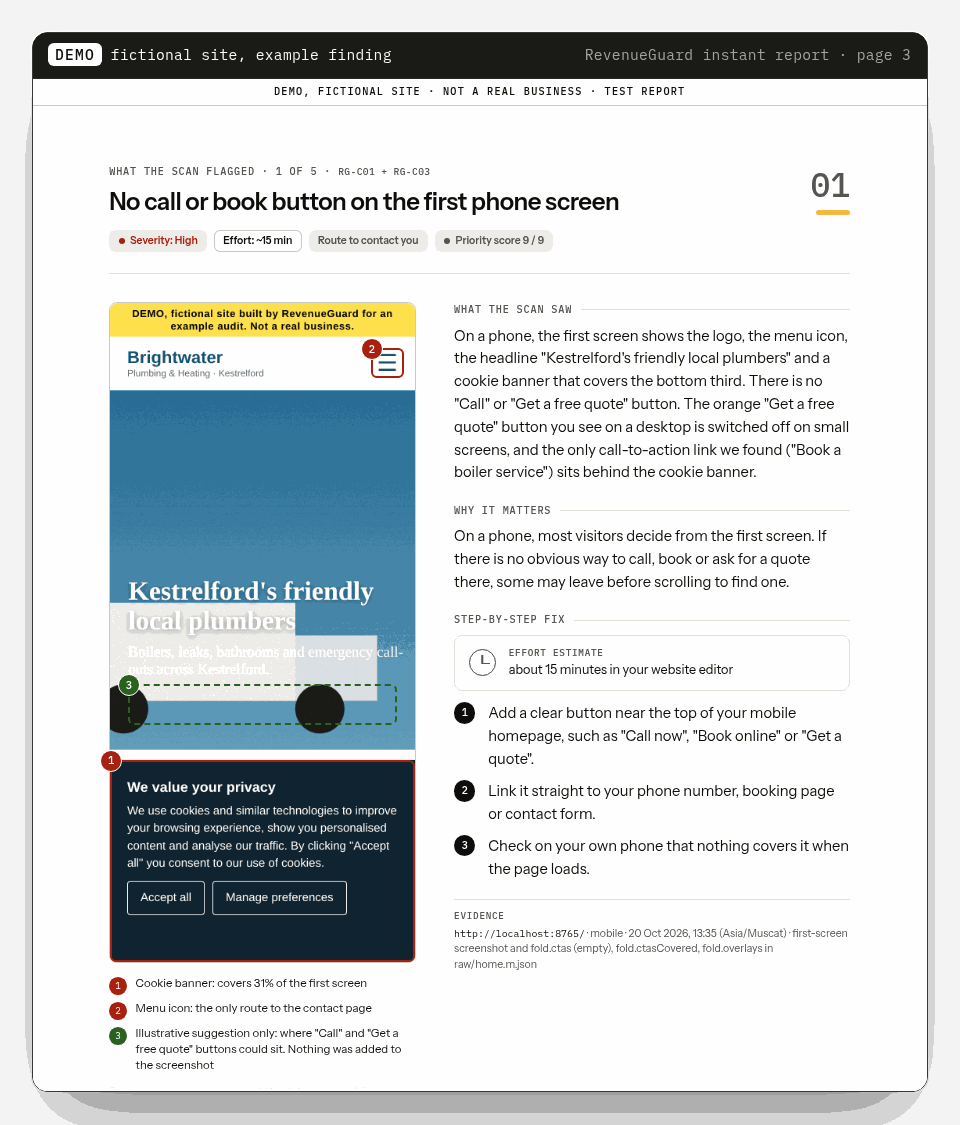
If the first screen has no Call, Book or Get a quote button, visitors have to hunt for the next step.
Broken scripts, leftover template text, very slow pages or a security warning can put people off before they read a word.
Our Audit Agents run 21 automated checks on the pages that matter most for calls and bookings. Your report shows only what the scan flagged, in priority order, not a long list of every test.
This is an example of the format, not a real customer's report.
Add your web address and email. The first report needs no card.
They load your public pages on a phone-sized screen and on desktop and runs 21 checks. This usually takes a few minutes.
We email you a link to your PDF report, usually within 5 minutes.
Make the fixes yourself or pass them to your web person, then run a new report to check they worked.
Your first report is free. After that, Monthly scans watches the same site, or you can buy a one-off report. Prices are in US dollars. Sales tax or VAT may be added at checkout depending on where you are.
US$0
One website
US$15 / month
The same website, scanned each month
Recommended
US$150 / year
Twelve monthly scans, paid once
US$19 one-off
A fresh scan of the same or another website
If a paid one-off scan fails, finds no high or medium problem, even on a partial scan, or no report arrives within 24 hours, we refund the US$19 without you having to ask. It can take several days to appear. A clean or failed month of Monthly scans refunds that month's US$15. A clean or failed month of the yearly plan refunds US$12.50.
If your question isn't here, email us.
Small local businesses that get customers through their website, such as plumbers, electricians, physios, dentists and salons, in the UK, the US and Australia.
Yes. RevenueGuard Audit Agents are automated software rules, not people. They scan your site and write the report, which is why it only takes minutes. No person reviews it, so it may occasionally flag something that's fine for your business. The report explains each finding so you can judge for yourself.
Your homepage and, where we can find it, your contact or booking page, on a phone-sized screen and on desktop.
Usually within 5 minutes, by email. If the scan can't finish, for example because the site is offline or blocked by bot protection, we'll tell you. A failed free scan doesn't use up your free report, and a paid one is refunded. The refund can take several days to appear.
Yes. You get every finding, screenshot and fix, with no card needed. It's one free report per email address and per website.
Only a website you own or are authorised to test. You confirm this when you request a report.
No. We only look at the public pages anyone can see. We never log in, submit your forms or make bookings.
No. The report tells you what to fix and how. You, your web designer or your hosting company can make the changes.
We can't promise that, and we won't. The report shows what may be getting in the way and how to fix it.
Your first report is free, with no card. A paid one-off report is refunded automatically if the scan is clean, if it fails, or if no report arrives within 24 hours. A clean or failed month is refunded without you having to ask. If you cancel Monthly scans within 7 days of your first payment, we refund that payment in full automatically. See the refund policy.
We use your email to send your report. Screenshots, PDFs and report data for a free or one-off report are kept for up to 90 days, then deleted. Monthly scans and yearly reports are kept while the plan is active and for 30 days after it ends. We don't publish or sell your report, and we only share it with the providers that run the service. We don't take card details on this site. See the privacy policy.
A one-off report has nothing to cancel. You can cancel Monthly scans with Cancel plan in the dashboard, or by emailing reports@tryrevenueguard.com. If you cancel within 7 days of your first payment, we refund that payment in full automatically and the plan ends at once. If you cancel later, scans continue until the end of the period you have paid for, and months you have not used are not refunded.
Email us and we'll delete the report. Site owners can also ask us never to scan their site again at tryrevenueguard.com/bot.
RevenueGuard is a product of Omniware, based in the Sultanate of Oman. Support is by email during working hours, Asia/Muscat time (UTC+4).
RevenueGuard is website-checking software from Omniware, and Audit Agents is the name of its automated checks. Omniware is a company based in Muscat, Oman. The Audit Agents scan the public websites of small local businesses in the UK, the US and Australia and report only what they actually found, with a screenshot as evidence. We never guess at your revenue, and we never ask for logins.
A free instant report on what may stop customers calling or booking, with clear fixes.